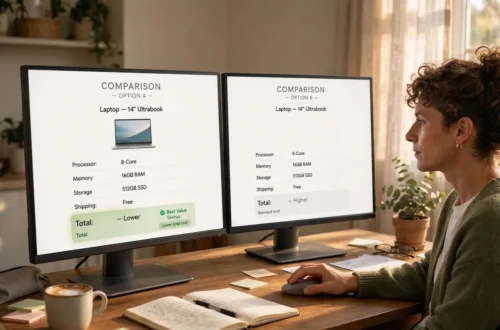








A price compare tool is a website or app that shows you prices for the same product from different sellers in one place. You type in a product name, and the tool gathers listings for you, saving you from opening store after store.
No tool does all the thinking for you, though. It cannot tell you if a seller is honest, if the product is the right model, or if the delivery and return rules suit you. This guide explains the main types of tools, how to use them well, and how to judge what they show you.
What is a price compare tool?
Think of a market where many stalls sit in one hall. Instead of walking from stall to stall, you stand in one spot and see what each seller offers. The tool does not usually sell the product itself. It points you to the seller. Start with the exact product name or model number, because a vague search can bring up products that only look alike.
The main types of price comparison tools

Comparison websites show listings from many stores on one page, handy for a wide view at home.
Price-history trackers show how a price has changed over time, helping you decide whether to buy now or wait. They show the past, not a future promise.
Price-alert tools let you set a target price, then send a notice when the price reaches that level. They suit shoppers who are not in a rush.
Browser helpers are small add-ons that work while you shop online, showing other sellers’ prices or a short price history right on a product page.
App-based comparisons live mainly as phone apps, handy for a fast check while you are out. Still open the full product page first, because short listings can leave out key details.
| Tool type | Best for | What it shows you | Watch out for |
|---|---|---|---|
| Comparison website | A wide first look at many sellers | Listings from different stores in one place | Listings may not cover every store |
| Price-history tracker | Deciding whether to buy now or wait | How a price has moved over time | Past prices do not predict future prices |
| Price-alert tool | Shopping when you are not in a rush | A notice when a price reaches your target | You still need to check the seller and product details |
| Browser helper | A quick check while you already shop | Prices or history on the product page | It may only cover sellers it works with |
| App-based comparison | A fast check while you are out | Prices you can view on your phone | Short listings can miss key details |
How to use a price compare tool
First, write down the exact product you want, including its size, colour, or model. Two products can share a name but differ in what comes in the box, so comparing different versions will mislead you.
Next, scan slowly for the same product, not just a similar one, and open the store page for any offer that interests you. That page gives the full details: what is included, delivery terms, and the return policy.
Then look at the total cost, not just the first price you see. Delivery, taxes, and extra fees can change which offer is truly cheaper. Check how fresh the price is, too, since a listing may be out of date. Finally, read the seller details: clear contact details, a fair return policy, and reviews that sound real and specific. If anything feels unclear, pause.
Price history: a useful second opinion

A price-history view is like a diary of prices. Imagine you want a new kettle. The price today looks fair, but the history shows it often drops during sale periods, so you might wait and set an alert instead.
Either way, the history is a guide, not a guarantee. Check its time range, and make sure it covers the exact same product.
Price alerts: let the tool watch for you

Price alerts suit shoppers who can wait. Say you want walking shoes, but you do not need them this week. You set an alert at a price you feel happy to pay, and the tool tells you when that price is reached. An alert is only a tap on the shoulder. It does not check the seller, the product version, or the return policy for you.
How to judge any price comparison tool
A good tool is clear: it shows which seller offers each price, when the price was last updated, and what is included. If it hides the seller name or makes the store page hard to reach, that is a warning sign. It should also cover a fair range of sellers, not just one or two. For an important purchase, try a second tool and compare the two.
Be careful with a tool that pushes one seller to the top without explaining why. A top spot may be paid for, or come from a partnership. Compare it with the others below it, and check that the tool covers your country and currency. The same goes for tracking: a tool that follows prices on one website may not follow them on another, so check which stores its history and alerts actually cover before you rely on them.
A fair look: price comparison tools, reviewed
What they do well. They save time, gather many listings in one place, and, with history and alerts, help you time a purchase with more calm. They turn a long search into a short, clear shortlist.
Where they fall short. No tool can check everything. Listings can be out of date, some sellers may not appear, and short listings can miss key details. A tool cannot judge quality for you, and price alone never tells the full story.
Who they suit. Shoppers who like to compare before they buy, who are not in a rush, or who want to watch a price over time.
Who they may not suit. Someone who needs a product at once, or who prefers one trusted local shop. They also may not help much for rare, handmade, or second-hand items, where each item is different.
The bottom line. Use a price comparison tool as a starting point, not the final word. Let it build your shortlist, then check the product, seller, and total cost yourself.
How this advice was put together (E-E-A-T note)
This guide is based on how price comparison tools are commonly built and used: comparison listings, price histories, alerts, browser helpers, and phone apps, plus the normal checks for any online purchase, such as matching the exact product and reading the full store page. It names no one tool as best for everyone, because the right tool depends on what you buy, where you live, and how you like to shop, and features can change. Before you buy, check the tool’s current features, confirm the price on the seller’s own page, and read the seller’s delivery and return policy yourself.
Frequently asked questions
What is a price compare tool?
A website or app that shows prices for the same product from different sellers in one place.
Can a price comparison tool guarantee the lowest price?
No. A tool can only show the listings it knows about when you search. Some sellers may not be listed, and prices can change. Always confirm the price on the seller’s own page.
Is a price-history chart a promise that the price will drop again?
No. A chart shows what happened in the past. It can help you judge timing, but it cannot promise a future price.
Should I trust the top result on a comparison site?
Not without checking. A top result may be there for many reasons, including a paid placement. Compare it with the other results and check the seller.
Which type of tool should a beginner start with?
Start with a simple comparison website for a wide view, and add a price alert if you can wait.
What is the best price comparison site?
There is no one best site for everyone. The best one for you is the one that covers the stores you actually use, shows the seller and the last update time clearly, works in your country and currency, and lets you check the full store page before you buy. If a tool only covers a few stores, use a second one as well.
A simple checklist before you buy
Is this the exact product, size, and model I want? Have I checked the total cost, including delivery? Have I read the return policy? Is the seller clear and easy to contact? Is the price fresh on the seller’s own page? If yes to each, you have found an offer you understand, at a total cost you can accept.